

📁 Workspaces & repositories
Scratch and GitHub workspaces, isolated session worktrees, and repository access.
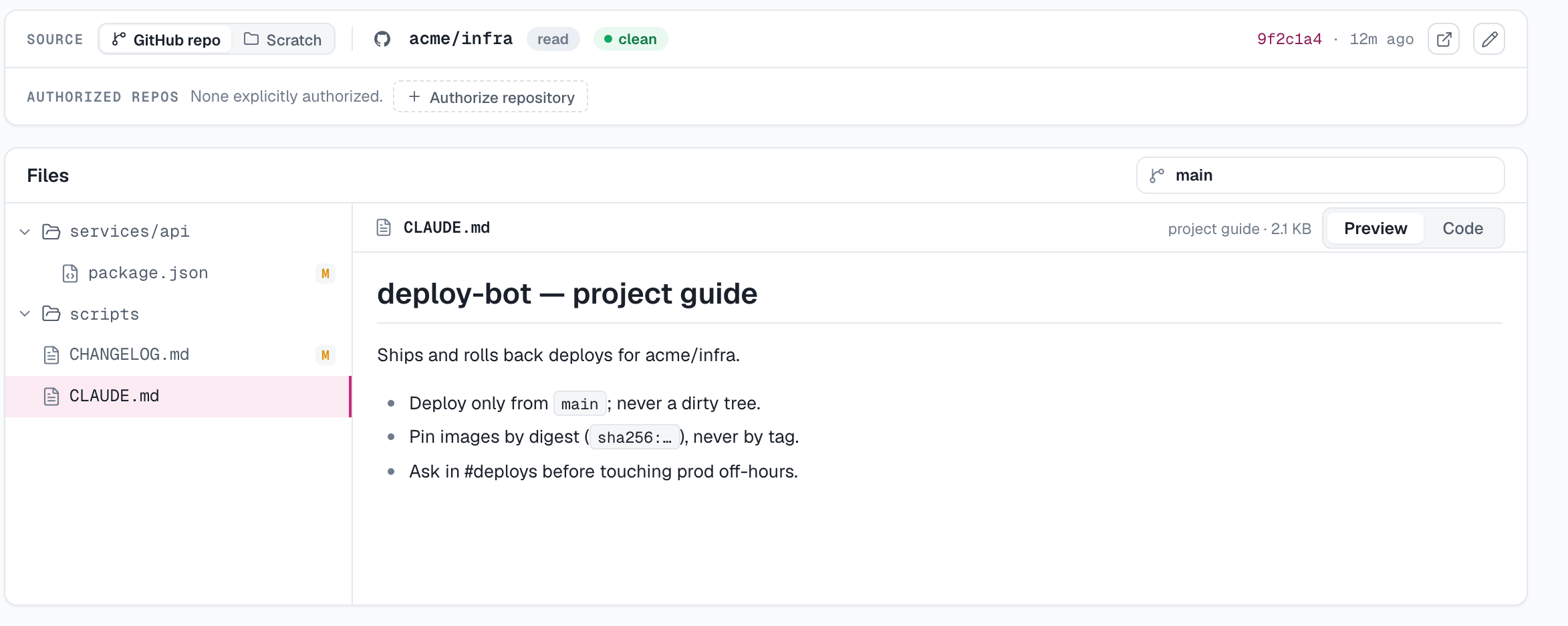
Every agent has a workspace — its working directory on the daemon. Choose its source when creating the agent, or change it later from the Workspace tab.
From scratch
A fresh directory on the daemon. Files the agent creates live only on that machine and aren't version-controlled. Good for reporting agents, chat-ops, and anything that doesn't start from existing code.
From GitHub
The daemon clones a repository and branch (optionally scoping the agent to a subdirectory), and the agent works inside that checkout.
To pick repositories from a list, install the AgentConnect GitHub app:
- In Add agent → From GitHub, click Install GitHub app (or go to Settings → GitHub → Install on GitHub).
- On GitHub, choose the account and which repositories to grant.
- Back in the dialog, pick the repository and branch, set the agent directory if the agent should live in a subfolder, and choose push access:
- Read only — the agent can pull but not push.
- Read & write — the agent can push to the repo.
On AgentConnect OSS, the deployment operator must configure the GitHub App first. Public repositories can still be cloned read-only without the App.
From GitLab
The same, from a GitLab project — on GitLab.com or a self-managed instance. Pick From GitLab, choose the project, branch, agent directory and access, and the daemon clones it.
There is no app to install: the deployment connects GitLab once, and each agent gets its own service account on the instance when you first pick a project for it. See GitLab. On AgentConnect OSS, the operator configures the deployment's GitLab OAuth application first.
From Gitea
The same, from a Gitea repository — on gitea.com or a self-hosted instance. Pick From Gitea, choose the repository, branch, agent directory and access, and the daemon clones it.
There is no app to install either: the organization connects Gitea once with a bot user's token, and the picker offers the repositories that bot administers. Every agent shares that one identity. See Gitea. On AgentConnect OSS, the operator points the deployment at the instance first.
Worktrees for concurrent sessions
New GitHub agents enable Worktree by default. Each session receives its own stable checkout, so concurrent sessions do not share branch or file state. Later turns in the same session return to that worktree. Turn Worktree off when every session should deliberately use the primary checkout instead.
The Workspace tab can switch between the primary checkout and worktrees belonging to sessions you are allowed to read. Session worktrees are browse-only in the console and follow the daemon's session retention policy.
Repository credentials
For an app-installed repository, AgentConnect supplies short-lived credentials scoped to that repository and the access level you chose. The daemon does not save a long-lived Git credential to disk. Removing the repository grant or uninstalling the GitHub App stops future access.
The Workspace tab
The agent's Workspace tab reads files directly from its daemon. Authorized users can inspect the primary workspace and visible session worktrees, edit files in a scratch workspace, or pull updates for a primary GitHub workspace. The view is unavailable while that daemon is offline because the files exist only on that machine.
Change the workspace source
Use Edit workspace on the Workspace card to switch between Scratch and GitHub, select another repository or branch, change the working directory, or change read/write access.
Changing the source type, repository, or branch replaces all daemon-local workspace files. Commit, push, copy, or otherwise back up anything you need before confirming. Changing only the working directory or access level preserves the checkout.
Additional authorized repositories
Sometimes one repo isn't enough — a reviewer agent may need to read a shared library or work in a sibling repo. On the agent's Workspace tab, the Workspace card lists Authorized repos:
- Authorize repository adds either Read only access or Read & write access.
- Grants are per-agent and revocable with one click.
- Credentials remain limited to the repositories you list.
By default an agent's GitHub credentials stop at its own workspace repository.
An authorization is more than a credential grant: the daemon checks the repository out beside the workspace as a secondary root and hands it to the runtime, so the agent reads and edits those files locally instead of over the network. A root is cloned on the first session that needs it, and one that fails to clone is left out of that session rather than failing it. The Workspace tab's file browser moves between the checkouts, and a code-host review whose subject lives in an authorized repository runs against an exact checkout of it. A Read only grant still cannot push, even though its files are on disk.
Updated 12 days ago