

✈️ Telegram
One token from @BotFather and your agent answers Telegram DMs and groups.
Telegram is the quickest chat integration: one token, no app review, no public URL — the daemon connects outbound to Telegram's API.
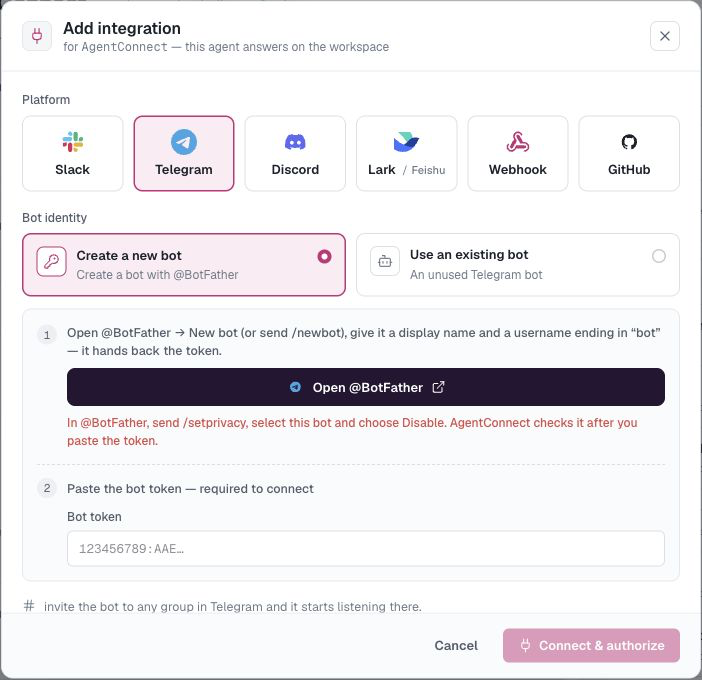
Create the bot
- In Telegram, message @BotFather, send
/newbot, and follow the prompts (bot name, then a username ending inbot). - BotFather replies with a bot token like
123456789:AAE…— copy it. - In @BotFather, send
/setprivacy, choose the bot, then select Disable. AgentConnect currently requires Group Privacy Mode to be off before it connects the bot.
Connect it
On your agent, open Integrations → Add integration → Telegram and paste the token. AgentConnect automatically validates it and checks Group Privacy Mode. If privacy is still enabled, the dialog keeps checking while you change the setting in @BotFather; Connect becomes available when Telegram reports that it is off.
AgentConnect automates the check, not the setting itself: Telegram's Bot API does not provide a way for AgentConnect to disable Group Privacy Mode.
Use it
- DM the bot — open
t.me/<your_bot_username>and just talk. - Groups — add the bot to a group. With Group Privacy Mode off, its AgentConnect trigger can use @-mention or any message. If a group added the bot before you changed privacy mode and ordinary messages still do not arrive, remove and re-add it once.
See In-conversation commands for stopping, cancelling, queuing, and changing supported session settings.
Notes
- One Telegram bot binds to one agent. Deleting the integration frees the bot for reuse (Use an existing bot next time).
- Bots and their tokens are managed org-wide under Settings → Bots → Telegram.
Updated 22 days ago