

🔍 Layered PR reviews
Review every PR revision with a fast model, then summon a stronger reviewer only when a change needs deeper analysis.
Use two agents to create a layered review workflow: a fast reviewer covers every pull-request revision, while a more capable model stays idle until a maintainer explicitly asks for a deeper review.
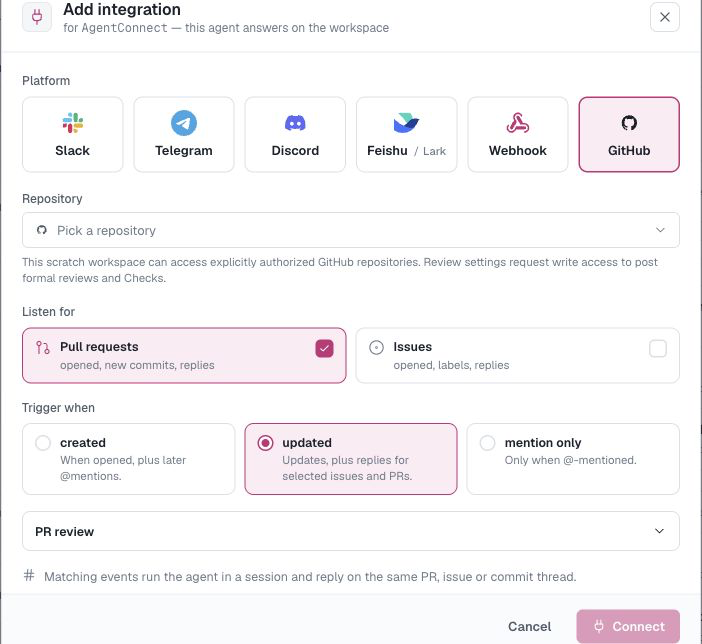
Both agents watch the same repository through one AgentConnect GitHub App. Each has its own runtime, model, instructions, session, and review settings.
This is the layered-specialist pattern from Multi-agent work modes. Compare it with trigger fan-out and direct delegation before configuring the reviewers.
| Agent | Model profile | Trigger | PR review | Role |
|---|---|---|---|---|
quick-review | Fast and efficient | updated | Brief | Baseline correctness and regressions |
deep-review | Strong reasoning | mention only | Details | Architecture, security, migrations, operations |
Before you start
You need:
- two online agents with the runtimes and models you want to compare;
- the AgentConnect GitHub App installed for the repository;
- write repository access for both agents; and
- effective GitHub App
pull_requests:writepermission. The deep reviewer also needschecks:writefor its informational Check.
See GitHub for integration behavior and Workspaces & repositories for repository authorization.
1. Configure the reviewers
Create two agents and give each one a narrow review role.
For quick-review, use a fast model and instructions such as:
Review each pull-request revision for correctness, missing tests, obvious security
issues, and compatibility regressions. Keep findings concise and actionable. Do not
claim approval or request changes; leave deeper architectural analysis to deep-review.
For deep-review, use the stronger model and instructions such as:
Perform a deep pull-request review. Prioritize architecture, concurrency, security,
data migrations, failure recovery, and operational risk. Verify findings against the
current diff and avoid repeating comments that are already resolved.
Keep the agent names stable. The deep reviewer's name becomes its targeted GitHub handle, such as @deep-review.
2. Watch the repository with both agents
On quick-review, open Integrations → Add integration → GitHub:
- Select the repository.
- Under Listen for, select Pull requests.
- Set Trigger when to updated.
- Set PR review to Brief.
Repeat on deep-review, but choose:
- Pull requests;
- mention only; and
- Details.
The updated cadence covers opened PRs, new revisions, and supported PR conversation events. Only revision-bearing events open an automatic review generation. If you only want the baseline review when a PR is first opened, choose created instead; later commits will then require an explicit mention.
3. Run the workflow
Opening a PR or pushing a new revision automatically runs quick-review.
When a change needs deeper analysis, an authorized maintainer adds a PR comment that names only the second agent:
@deep-review Please review the concurrency, migration, and rollback risks in this revision.The agent handle narrows the repository fan-out, so this comment runs deep-review without rerunning quick-review. Handle matching is case-insensitive and requires the complete agent name.
Mentioning the GitHub App instead — for example, @your-agentconnect-app — is the broadcast form and runs every matching reviewer for the repository.
What appears on GitHub
Each agent keeps a separate PR session. A reviewer with informational Check reporting enabled appears as:
AgentConnect PR Review: <agent-name>Both agents still write as the same installation-level GitHub App identity. For that reason, this pattern keeps the baseline reviewer on Brief, which can submit a formal COMMENT review but cannot APPROVE or REQUEST_CHANGES. The deep reviewer uses Details for the decisive verdict, inline comments, and informational Check.
AgentConnect Checks are currently informational rather than required branch-protection gates.
Important behavior
- The visible mention must come from a current repository maintainer with
writeoradminpermission. A comment authored by the GitHub App is rejected as a trigger, even if its text contains@deep-review; this prevents bot-to-bot loops. GitHub's native Request review control can also request the App, but it runs every matching reviewer rather than onlydeep-review. - A targeted
@deep-reviewmention wins over the baseline reviewer's broader updated cadence for that delivery. - Nobody has to remember the exact name. An organization team named
deep-reviewmakes@<organization>/deep-reviewautocomplete in the comment box and summon the same agent — see Make the agent name autocomplete. - Re-run all checks reruns the current AgentConnect review Checks in the App's suite. Use the individual Check action when you want only one reviewer.
- PR bodies, diffs, and comments are untrusted input. Use conservative agent permissions, especially on public repositories.
For automatic model escalation without a maintainer mention, use trusted agent-to-agent orchestration instead of trying to trigger another agent through a visible GitHub bot comment.
Troubleshooting
| Symptom | Check |
|---|---|
@deep-review does nothing | Exact agent name; write/admin author; mention only trigger |
| Both reviewers run | Mention the agent, not the GitHub App |
| No inline comments or verdict | Details; repository write; App pull_requests:write |
| No informational Check | Check reporting and App checks:write |
Updated 29 days ago