

📥 Install the daemon
Put the AgentConnect daemon on any machine — one command to try it, one more to make it permanent.
The daemon is the machine-side half of AgentConnect: it hosts your agents, drives their runtimes over ACP, and holds every platform connection. This page covers getting it onto a machine and keeping it there.
Requirements
- macOS or Linux (launchd and systemd are supported for background service mode).
- Node.js 24.12 or newer — use
@agentconnect.md/cli, the stable entry point that installs, launches and upgrades the daemon for you. - At least one agent runtime installed and authenticated on the machine — e.g. Claude Code (
claude) or Codex (codex). The daemon detects runtimes automatically (from the machine's installed launchers, via the ACP registry) and reports what it finds — runtimes, versions, models — to the console. - Outbound network only. The daemon dials out to your configured Control Plane and to the chat platforms. It never listens on a public port, so it runs fine on a laptop behind NAT.
- Optional Linux sandboxing: SRT (default) requires
bubblewrap,ripgrep,socat, and unprivileged user namespaces. microsandbox requires KVM and vsock access. See Sandboxing for setup and Credential protection for login support.
Connect a machine
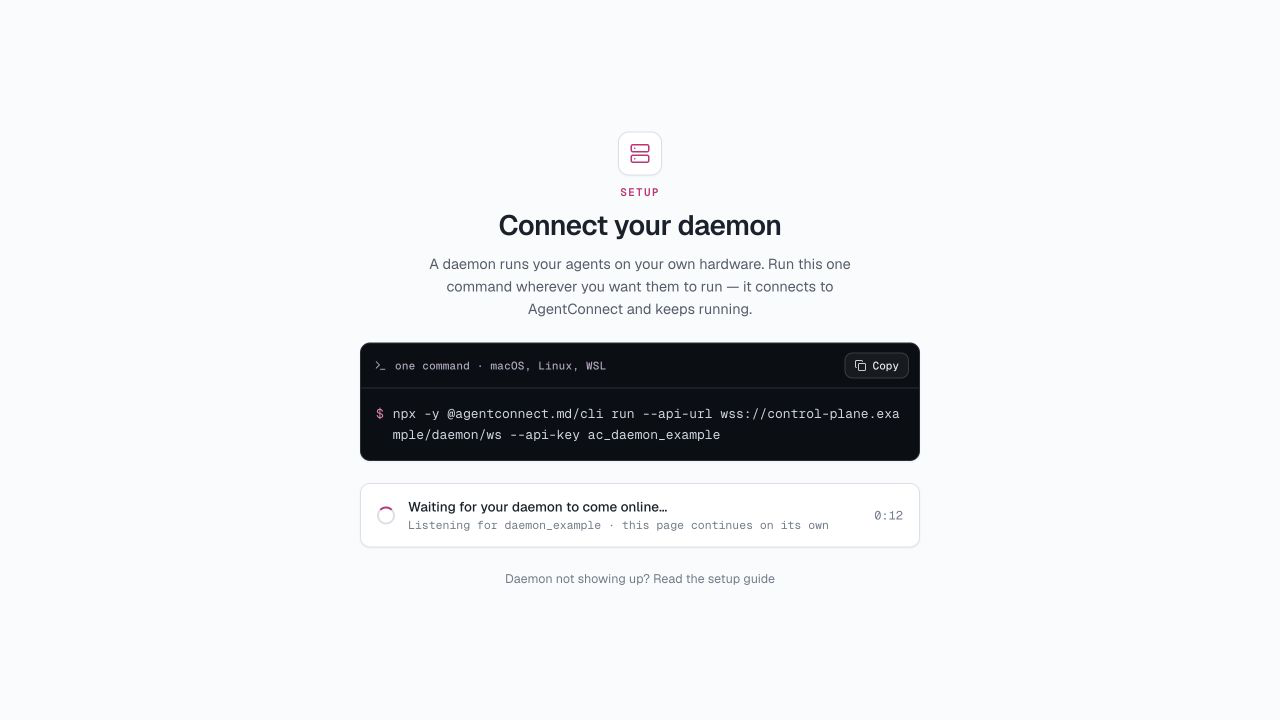
In a new organization, onboarding shows the connection command inline. If you skipped onboarding, open Daemons → Add daemon. Both paths mint a one-time key and show the exact command to run on the target machine:
npx -y @agentconnect.md/cli run --api-url <your-control-plane-ws-url> --api-key <one-time-key>Copy it from the console (the key is shown only once) and run it. The page continues when the daemon comes online. The Run command starts the daemon in the foreground using the supplied credentials. The CLI downloads the appropriate daemon release on first use, then registers it and starts heartbeating.
Run it permanently
agentconnect run stays in the foreground — good for a first try, wrong for a machine that should serve your team. Switch the Add daemon modal to Install as service and copy its login command instead:
# Verifies the key and saves it, then offers to install and start the service.
npx -y @agentconnect.md/cli login --api-url <your-control-plane-ws-url> --api-key <one-time-key>
If you have already authenticated with login, you can install and start the service separately:
npx -y @agentconnect.md/cli install-service   # register launchd / systemd service
npx -y @agentconnect.md/cli up                # start it
Install and authenticate agent runtimes as the OS user who owns the service, then restart the daemon after changing that user's runtime installation or PATH.
What a runtime sign-in brings
Signing a runtime in gives its agents access to that provider's models. For some runtimes it would also bring the tools attached to that cloud account — mail, chat, files, issue trackers that act as the person who signed in, on any machine that authenticates as them. AgentConnect turns those off when it starts a runtime, so an agent gets the MCP servers you gave it plus the runtime's own local configuration, and nothing extra from the sign-in. Model access is untouched.
Each runtime is switched off with the narrow lever it publishes, and that lever exists only from a given release onwards — keep runtimes current, or an older build silently keeps its account tools. If a runtime inherits account tools with no safe switch, or AgentConnect does not recognize it, the daemon says so in its log.
On a personal machine you can allow them. Set this in config.json and restart:
{
  "security": {
    "isolateAccountApps": false
  }
}
It covers the whole daemon and every runtime on it, so each agent there may act with the account tools of whichever identity its runtime is signed in as. There is deliberately no per-agent version — this is the host owner's call, not something an agent's editor can switch on.
Manage it with:
| Command | What it does |
|---|---|
npx -y @agentconnect.md/cli status | Show service state, PID and the log file path |
npx -y @agentconnect.md/cli up / down / restart | Start / stop / restart the background service |
npx -y @agentconnect.md/cli uninstall-service | Stop and remove the service |
npx -y @agentconnect.md/cli run | Run in the foreground (ignores the service) |
npx -y @agentconnect.md/cli upgrade --restart | Upgrade, restart, health-check and roll back on failure — see Upgrade the daemon |
What lands on disk
Everything the daemon owns lives under one root, ~/.agentconnect by default:
~/.agentconnect/
├── config.json          # control-plane URL + key, daemon identity
├── agents/              # one directory per agent: config + workspace
├── state/local.sqlite   # local state (sessions, queues)
├── logs/daemon.log      # daemon log
├── run/                 # runtime sockets
├── versions/            # installed daemon releases
├── current              # active daemon release
└── versions.json        # release channel and upgrade history
Useful CLI and daemon-run flags:
| Flag | Meaning |
|---|---|
--root <dir> | Change the root (AGENTCONNECT_ROOT) |
--config <path> | Use another config.json |
--api-url <url> / --api-key <key> | Set Control Plane credentials for run or login |
--agents-dir <dir> | Change the agents directory |
--max-agents <n> | Cap how many agents this daemon will host |
--log-level <level> | trace debug info warn error |
--require-sandbox | Fail startup unless every agent can be sandboxed |
Good to know
- Updates: the CLI keeps installed daemon releases under the daemon root. Run
npx -y @agentconnect.md/cli upgrade --restart, or use Upgrade in the console, to switch releases with a health check and automatic rollback on failure. See Upgrade the daemon. - Sandboxing: a supported Linux daemon can confine selected agents, or require the boundary for every agent and fail closed. See Sandboxing before using it as a production guarantee.
- A temporary Control Plane outage does not stop established work. Existing sessions and platform connections continue until the daemon reconnects.
- Multiple machines: add as many daemons as you like — a beefy workstation for heavy agents, a laptop for experiments. You can later move an agent between compatible online daemons; see Manage daemons.
Updated 13 days ago