

🔑 Variables & secrets
Set runtime environment values once for an organization or directly on one agent.
Variables and secrets become environment variables in an agent's runtime. Define a shared value once at the organization level, or keep it local to one agent.
| Scope | Manage from | Applies to |
|---|---|---|
| Organization | Settings → Variables & secrets | All or selected agents |
| Agent | Agent → Configuration | One agent |
Use variables for ordinary configuration such as endpoints and feature flags. Use secrets for credentials and other values that should never be shown again after saving.
Share a value across agents
Only organization Owners can manage the organization registry:
- Open Settings and find Variables & secrets.
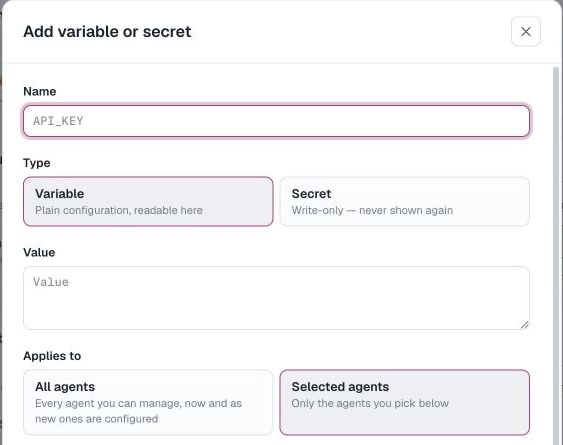
- Select Add, then choose Variable or Secret.
- Enter a standard environment-variable name such as
SERVICE_URLorSERVICE_API_KEYand its value. - Choose All agents or Selected agents.
- Save the entry.
Names may contain letters, digits, and underscores, and cannot start with a digit.
All agents assigns the entry to every agent you can manage and automatically applies it to agents you configure later. Selected agents applies it only to the agents you choose. The picker lists only agents you can manage; editing that selection does not remove existing assignments to other private agents.
An assigned entry appears on the agent's Variables or Secrets card with an Organization label. It is read-only there. Owners edit or rotate it from Settings; other agent editors can still manage that agent's local entries.
Set a value on one agent
Open the agent's Configuration tab, then edit its Variables or Secrets card. These entries belong only to that agent.
When creating an agent, the final Variables and Secrets step adds the same agent-local values. Organization entries set to All agents are applied when the agent is created.
Precedence
An assigned organization entry normally wins when the agent also has the same name:
| Organization entry | Agent entry | Effective value |
|---|---|---|
| Variable | Variable | Organization variable |
| Secret | Variable or secret | Organization secret |
| Variable | Secret | Rejected |
The last case is rejected because a readable variable must not replace a write-only secret. An overridden agent entry is retained as a fallback and becomes effective again if the organization assignment is removed or deleted.
Organization names are unique across variables and secrets. Names and types cannot be changed after creation; delete and recreate an entry to rename it or change its type.
Secret handling
Secret values are write-only. After saving, AgentConnect shows the name and a mask; editing offers Replace value instead of reading the current value. Variable values remain visible to people who can view the assigned agent, so do not store credentials as variables.
Write-only controls what people can retrieve through the product, not how the value is stored everywhere. For AgentConnect OSS, configure secret storage encryption to protect values at rest in the Control Plane database. The daemon that runs the agent keeps its own copy of the resolved value in the agent's local configuration file, readable by the operating-system user that runs the daemon. Treat every machine you connect as trusted with the secrets of the agents placed on it.
Secrets are available to the agent runtime and its tools. AgentConnect attempts to mask known literal secret values if they appear in agent output, but masking is not a security boundary. Give each agent only the secrets it needs and use appropriate permissions and sandboxing.
Variables and secrets reach the agent as environment values only. They do not expand placeholders in agent descriptions, schedules, integration settings, or other configuration.
Kubernetes and Docker credentials
Two names are delivered as files instead, because the tools that need them expect a path rather than a value:
| You set | The agent's tools get |
|---|---|
KUBECONFIG_DATA | KUBECONFIG, pointing at the written kubeconfig file |
DOCKER_CONFIG_DATA (or the older DOCKER_AUTH_CONFIG) | DOCKER_CONFIG, pointing at the written config directory |
Put the file's full contents in the …_DATA secret. AgentConnect materializes it as an owner-only file while the agent is working and points kubectl or docker at that file. Set either the …_DATA secret or the corresponding pointer variable yourself, not both.
Updates and removal
Rotating, retargeting, or deleting an organization entry updates the affected agents and restarts them so future work uses the new environment. Rotate during a quiet moment if an active turn matters.
Removing an assignment restores a same-name agent-local fallback. If there is no fallback, the value disappears from future runtime processes.
Updated about 2 months ago