

🔗 Linked accounts
Use several sign-in methods with one AgentConnect profile, and understand exactly which permission checks each provider identity affects.
One AgentConnect profile can use multiple social sign-in methods. AgentConnect Cloud currently offers GitHub, Google, and Slack. A self-hosted deployment can additionally configure Lark and Feishu identities as described in Logto authentication.
Linking another provider gives the same profile another way to sign in and, where supported, a provider-specific identity for a narrowly defined permission check. It does not combine the providers into one pool of permissions.
Open the avatar menu → Your profile and find Sign-in methods.
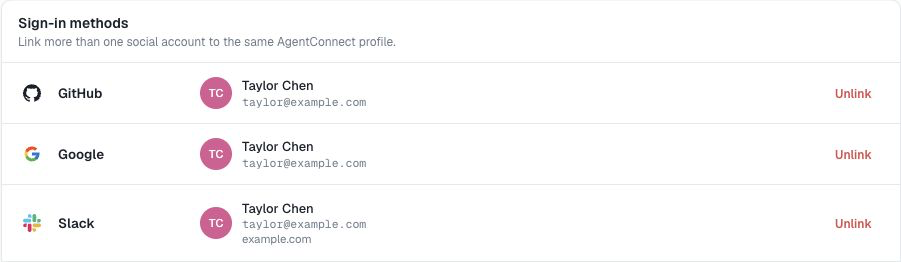
Link an account
Choose Link beside a provider and complete its authorization flow. GitHub and Google do not require an ownership code. Slack and Standard OAuth connectors can first ask for a code sent to the current profile's verified primary email; on a self-hosted deployment, ask the operator whether email verification is configured.
After linking, you can sign in through any linked provider and reach the same AgentConnect profile, organizations, memberships, and personal settings.
A provider account that already belongs to another AgentConnect profile cannot also be linked to this one. AgentConnect refuses the link and leaves both profiles unchanged.
Unlink an account
Choose Unlink beside a connected provider. You must keep at least one social sign-in method, so the final linked provider cannot be removed.
Unlinking removes only that sign-in method and its provider-specific identity:
- Removing GitHub does not uninstall the GitHub App or delete existing agents and repository grants. The profile can still select public repositories read-only, but cannot verify private-repository or write access or read synchronized private-repository sessions until GitHub is linked again. Public-repository sessions are unaffected.
- Removing Google removes a sign-in option and no provider-specific permission.
- Removing Slack removes the workspace identity from authorization immediately. Existing Slack session records are not deleted, but private DMs and Slack-scoped shared sessions that depended on the match are no longer visible. Relinking the same workspace identity can make them visible again without rewriting the sessions.
- Removing Lark or Feishu removes only that regional identity. Matching private DMs and membership-scoped sessions are no longer visible until the same identity is linked again.
What linking never changes
Linking or unlinking a provider does not change:
- the AgentConnect profile ID;
- organization membership or role;
- agent, daemon, schedule, tool, or skill team visibility;
- existing resource-sharing grants; or
- another provider's permissions.
One exception is worth knowing: a restricted agent's 1:1 Slack DM with a person who is already in that agent's shared-with audience seeds to the ordinary DM default rather than Off, once that person has linked their Slack identity in the same workspace. Both halves must hold — an unlinked member of the audience and a linked non-member each keep the conversation Off — and it applies only to 1:1 DMs on Slack, never to channels or group DMs. The rule re-evaluates when a link lands or the audience widens, it never reopens a conversation an editor turned Off deliberately, and it never closes one. Everything else about a restricted agent, including channel access, still starts Off.
Linking also does not merge two AgentConnect profiles, install a GitHub App, authorize repositories, or install a chat bot. See Permissions for the boundaries that still apply.
What each provider adds
| Provider | Adds | Does not add |
|---|---|---|
| GitHub | Sign-in and a GitHub identity for setup and session checks | App installation or repository access |
| Sign-in | Provider-specific authorization | |
| Slack | Sign-in and one workspace identity for session checks | Bot installation or cross-workspace identity |
| Lark | Sign-in and a regional identity for supported session checks | Bot installation or Feishu identity |
| Feishu | Sign-in and a regional identity for supported session checks | Bot installation or Lark identity |
A linked Slack identity can match the owner of a private Slack direct-message session, and is used for the conversation check when the organization enables Follow Slack access. A linked Lark or Feishu identity works the same way for its chats when its Logto record contains the provider's cross-App union_id. Linking a matching account can therefore make existing sessions visible; unlinking removes that provider match. See Session visibility.
Two GitHub policies use the identity differently
- Per-user repository authorization checks the signed-in person during repository setup. Public repositories can be selected read-only without a linked GitHub identity. Private repositories require a linked identity with access, and Read & write always requires the linked GitHub user to have
writeoradminpermission. - Follow GitHub access controls who may read GitHub-triggered sessions. Public-repository sessions require no linked identity; private-repository sessions require a linked GitHub profile with current repository access.
The repository picker and GitHub event integrations still require the deployment's GitHub App to cover the repository. A public repository can also be used as an anonymous read-only workspace without the App. Neither linking nor either policy grants repository access by itself.
GitHub webhook authorization is separate again: AgentConnect checks the current repository permission of the issue, pull-request, or comment author. The signed-in console user's linked GitHub account does not grant another GitHub author permission to trigger an agent. See GitHub.
Checks stay provider-specific
| Permission check | Identity AgentConnect uses |
|---|---|
| GitHub setup or a private-repository session | Linked GitHub profile |
| Slack direct message or shared conversation | Linked Slack workspace profile |
| Lark or Feishu conversation | Linked regional profile; current membership when Follow access is on |
Linking several methods lets one AgentConnect profile satisfy several independent checks. It does not let one provider substitute for another. Google remains a sign-in method with no provider-specific authorization, and public GitHub sessions remain available to every organization member independently from the owning Agent's Team visibility.
AgentConnect does not create a broader permission union across providers or provider workspaces. Do not assume that:
- one social account can prove ownership of another provider's session;
- one provider can satisfy another provider's repository or conversation gate;
- one Slack identity represents the same user in every workspace, or one app-scoped Lark or Feishu identity directly matches every bot app; or
- linking any provider widens organization access or resource visibility.
AgentConnect OSS setup
AgentConnect OSS does not enable social sign-in by default. To offer linked accounts, bootstrap Logto-backed sign-in in Setup, enable the displayed sign-in methods there, and create the matching Logto connectors. The Profile card appears after OIDC sign-in is enabled.
The operator must also enable Logto account linking, configure provider identity lookup, and provide email delivery for providers that require an ownership code. Local no-auth mode does not infer a linked provider identity.
See Logto authentication for the complete setup.
Updated 30 days ago