

🧰 Tools & Skills
Register shared capabilities once, then enable the right tools and skills for each agent.
Tools & Skills is the organization library for capabilities your agents may use. Register an MCP provider, connector, or Git skill source once, then explicitly choose which agents receive it. New agents start with an empty tool and skill allowlist.
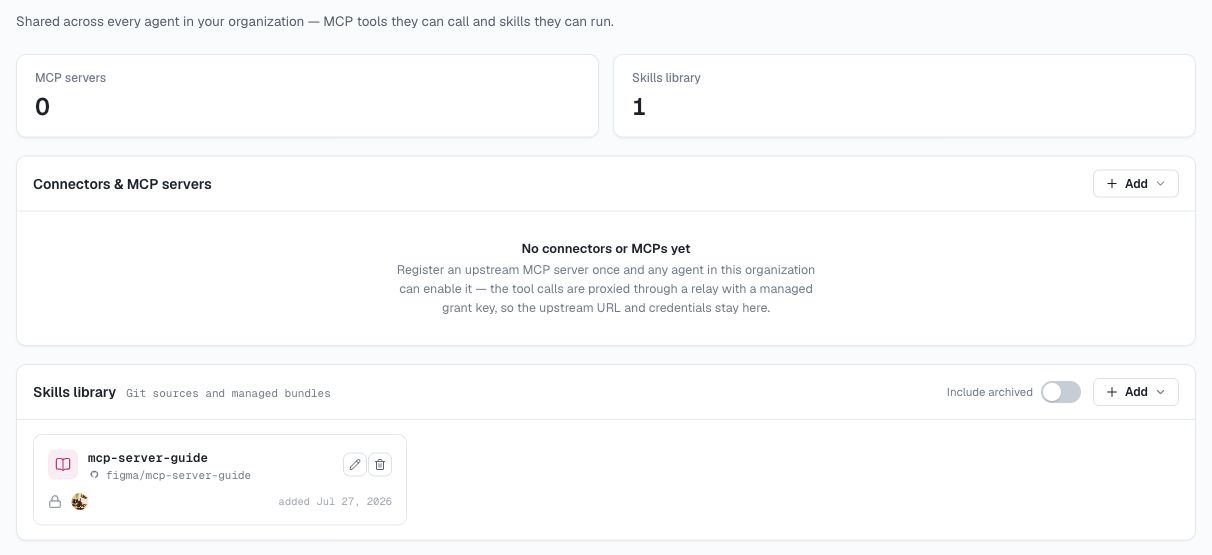
AgentConnect keeps organization management separate from agent enablement:
| Capability | Add or manage it | Enable it for an agent |
|---|---|---|
| Connector or custom MCP server | Tools & Skills → Connectors & MCP servers | Agent → Tools & Skills → Tools |
| Git skill source | Tools & Skills → Skills library | Agent → Tools & Skills → Skills |
| Managed skill | Knowledge → Suggestions, then Skills library | Agent → Tools & Skills → Skills |
Adding something to the organization library does not automatically give it to every agent.
Connectors & MCP servers
Open Tools & Skills and use Connectors & MCP servers to register an upstream capability:
- Add connectors browses the available OpenConnector providers and walks through their authorization.
- Custom MCP provider connects an HTTP MCP endpoint by URL, with optional upstream headers.
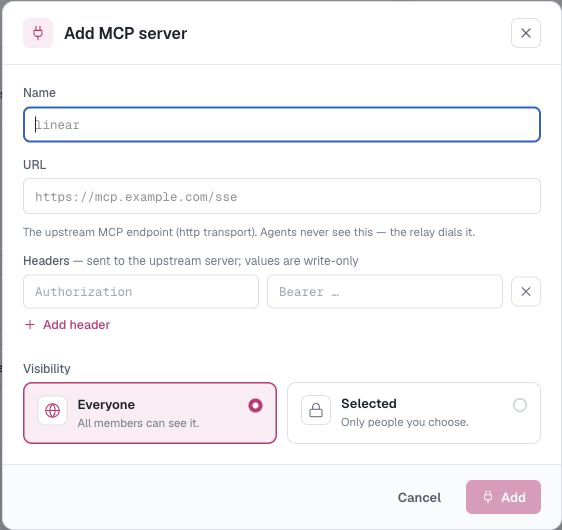
Choose Everyone or Selected team visibility when you add the provider. Header values are write-only after saving, and agents receive access without seeing the stored credential.
A provider appears as eligible for an agent only when the agent's daemon and selected runtime support its transport. Registering the provider makes it available to choose; it does not turn it on for any agent.
Before deleting a provider, switch it off for every agent that enables it.
Add a connector
- Open Tools & Skills → Connectors & MCP servers and choose Add connectors.
- Search the catalog or filter by category, then select a service.
- Choose an authorization method. API key, custom credential, and no-auth connections save immediately; OAuth opens a popup to authorize with the provider.
- Name the connection. Use up to 32 letters, digits,
_, or-, starting with a letter or digit. The name must be unique in the organization, and it cannot match an MCP server name an agent already enables. - Choose its team visibility, then create it.
The connection then behaves like any other entry in Connectors & MCP servers: it stays off until you enable it for an agent.
When a token expires or an upstream key rotates, open the connection and choose Reconnect connector or Edit API key. A connector's endpoint and headers are managed for you and cannot be edited by hand, so reconnecting is how you refresh its credential.
If a service you expect is missing from the catalog, it is usually one of two cases. Services AgentConnect integrates directly — GitHub, GitLab, Linear, Slack, Telegram, Discord, and Lark / Feishu — are kept out of the connector catalog by default in favor of their own integrations. Services that authorize solely through OAuth appear once an OAuth client is configured for them in the deployment — on a self-hosted stack, see Deployment and configuration.
A service that offers OAuth alongside another method stays listed either way. Only the OAuth choice is withheld until its client is configured, so you may see a service in the catalog with fewer authorization options than the provider actually supports.
Skills library
The Skills library contains two source types with different lifecycles:
| Source type | How it gets there | Lifecycle |
|---|---|---|
| Git skill source | Search skills.sh or import a GitHub repository | Editable; updates reinstall enabled sources |
| Managed skill | An Owner accepts a suggestion | Immutable revisions; archive or restore |
Managed skills and Git sources remain clearly labeled even though they share one library. Adding a skill to the library never enables it automatically.
Install from skills.sh
Use the public skills.sh registry when you know the capability you want but not its repository:
- Open Tools & Skills → Skills library and choose Install from skills.sh.
- Search by skill name and select a result.
- Optionally change its library name, choose its team visibility, and select Install.
Each result registers exactly that skill from its owner/repo source. It becomes an ordinary Git skill source in the organization library and remains disabled until you enable it for an agent. If the registry cannot be reached, retry later or use Import from GitHub with a repository you already know.
Import from GitHub
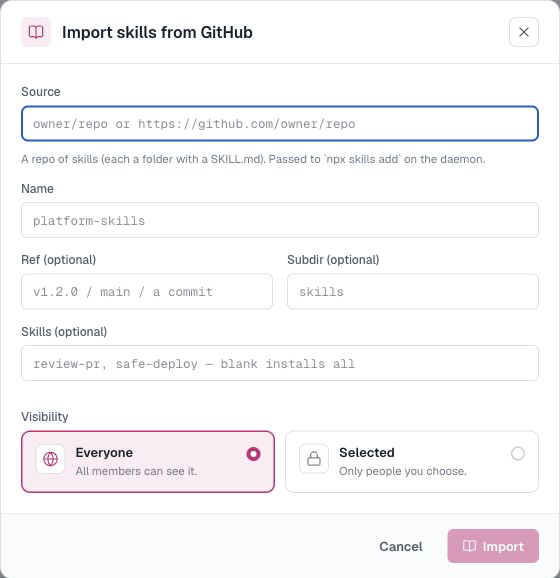
- Open Tools & Skills → Skills library and choose Import from GitHub.
- Enter
owner/repoor a GitHub repository URL. The repository should contain each skill in a folder with aSKILL.mdfile. - Optionally set a display name, branch/tag/commit Ref, Subdir, or a list of specific Skills. Leave Skills blank to include all discovered skills.
- Choose its team visibility and select Import.
Both registry installation and direct import support only public skill repositories today. If you set Subdir, provide a Ref unless AgentConnect can resolve the repository's default branch through the organization's GitHub App.
AgentConnect installs enabled skills on the owning daemon. Pin a tag or commit when you need reproducible content across daemons. Before deleting a source, disable it on every agent that uses it.
Enable tools and skills for an agent
Open the agent and select its Tools & Skills tab.
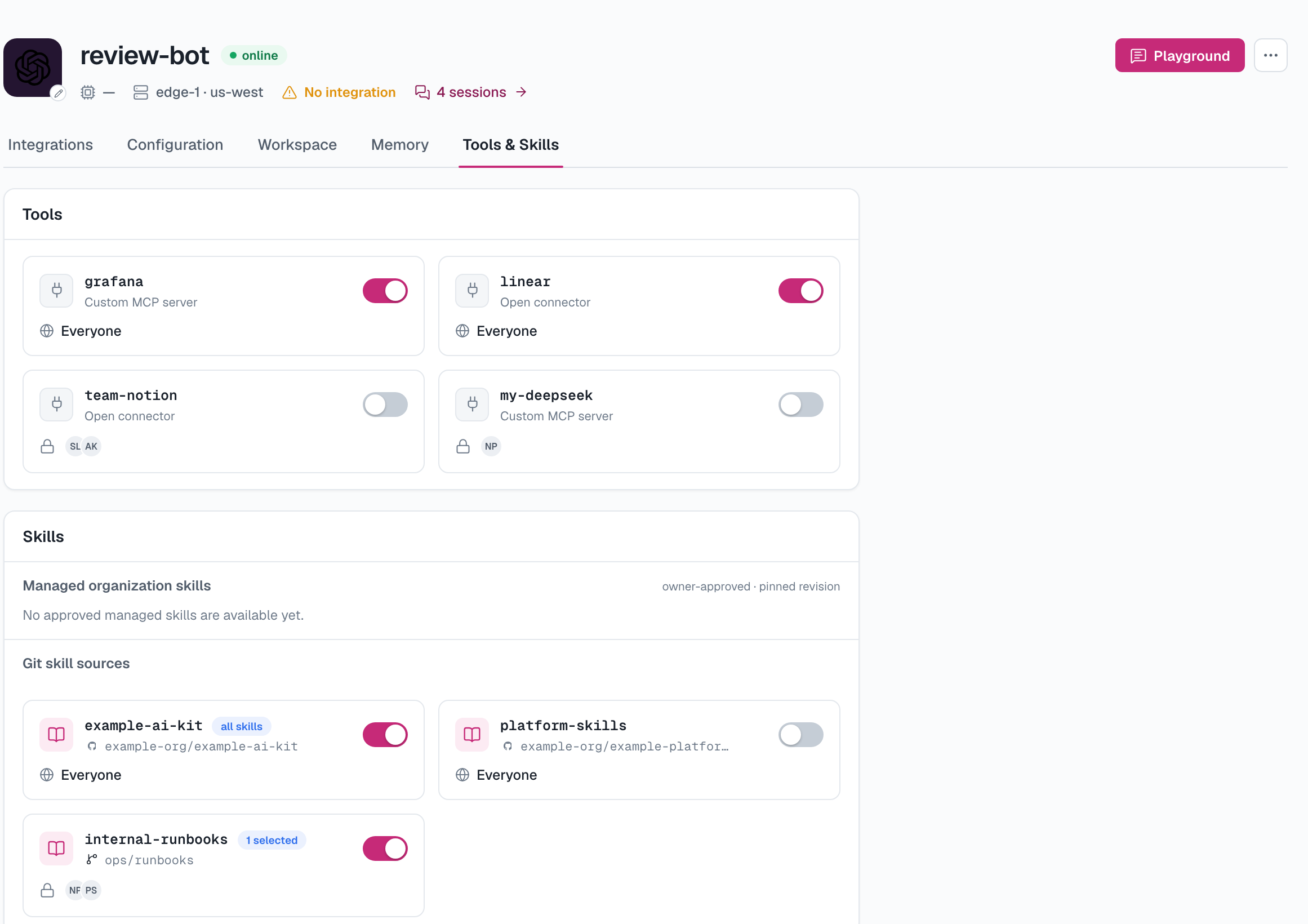
Under Tools, turn on the MCP providers that agent should receive. The list combines providers registered by the organization with servers reported by the agent's daemon, then filters them by the selected runtime's capabilities.
Under Skills:
- enable an approved managed skill to use its current immutable revision;
- enable a whole Git source; or
- expand a Git source and select individual discovered skills.
An archived managed skill cannot be enabled.
Loaded from the workspace
The agent's Tools & Skills tab also shows the skills its prepared workspace can actually load. Each row identifies its origin as Dream, Managed, Git source, or Repo, so you can distinguish organization-managed capabilities from skills committed directly with the project. This live list appears after the workspace has been prepared and is unavailable while the owning daemon is offline.
Visibility and roles
MCP providers and Git skill sources have independent team visibility: Everyone or Selected. Selected grants access to the chosen current organization members and every organization Owner. At least one member must remain explicitly selected. The current user starts selected when creating one and may replace themselves after selecting someone else; Owners retain access through their role. Collaborators can create and edit resources they are allowed to access, while Viewers are read-only.
Managed-skill approval, revision governance, and archive or restore actions require an organization Owner.
Team visibility controls which people can discover and manage a resource. The agent's explicit enablement controls whether that capability reaches the agent process; the two checks are separate.
Updated 2 days ago