

🔌 Integrations overview
How agents meet channels — bots, integrations, shared bots, and the commands that work in any conversation.
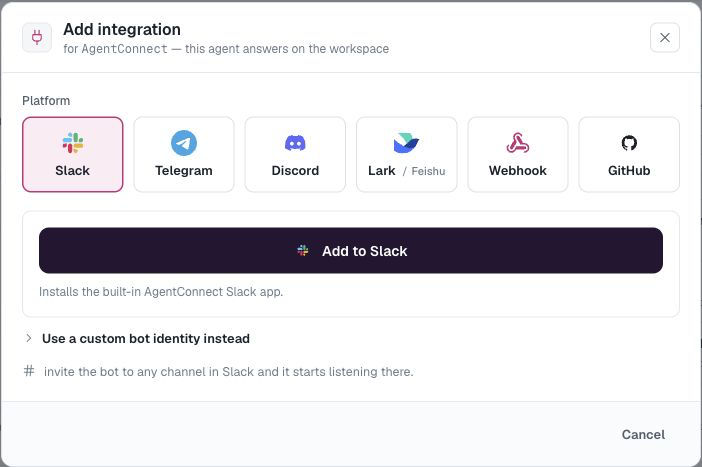
An integration binds one agent to one way of reaching it. The supported kinds:
| Platform | The agent responds to | You provide |
|---|---|---|
| Slack | Channels, threads, and DMs | Cloud Add to Slack or a custom Slack App |
| Telegram | DMs and group messages | A bot token from @BotFather |
| Discord | Channels, threads, and DMs | A bot token; AgentConnect builds the invite |
| Lark / Feishu | Group mentions and one-to-one chats | One-click app setup or an App ID + secret |
| GitHub | Issues, PRs, comments on watched repos | The AgentConnect GitHub app |
| GitLab | Issues, merge requests, comments on watched projects | An OAuth connection; each agent gets its own bot |
| Gitea | Issues, PRs, comments, reviews on watched repos | One bot user's token, per organization |
| Linear | Issues delegated to the app, or mentions by name | Approval of the workspace in a Linear popup |
| Webhooks | Anything that can POST JSON | Nothing — we mint the endpoint |
Add one from the agent page (Integrations → Add integration) or from the Agents list.
Bots are identities, integrations are bindings
For the chat platforms, the thing that lives in your Slack workspace, Telegram group, Discord server, or Lark / Feishu tenant is a bot — a durable identity with its own tokens. An integration binds that bot to one agent.
- Deleting an integration frees the bot rather than destroying it — reuse it for another agent from the Use an existing bot picker.
- Bots are managed org-wide under Settings → Bots: see Bots.
Platform tiles are enabled based on what the agent's daemon supports. On AgentConnect Cloud, Slack and Lark / Feishu offer guided setup, while Telegram and Discord begin with a bot token. Self-hosted operators can choose direct connections or Relay-backed callbacks in the platform-specific setup.
Binding channels
There's no channel picker: invite the bot to a channel and it appears in AgentConnect. Each joined channel then shows up on the agent's Integrations card with a per-channel trigger:
- @-mention — the default; unmentioned follow-ups continue in a thread the agent already joined.
- Any message — run the channel's agent for every message.
- Off — do not respond in that channel, including to mentions, existing thread affinity, control commands, or shared-bot fallback.
Off keeps the bot in the channel, preserves past sessions, and only mutes inbound activation. A schedule or another agent's deliberate handoff can still post there. Manage the bot's actual channel or server membership on the chat platform.
Linear has the same shape with a different roster: its conversations are the workspace's teams, listed for you the moment you connect it, and a team row takes only @-mention or Off — every Linear event is addressed to the app already.
Direct messages
A direct message appears after someone writes to the bot, and each agent controls its own direct conversations. One-to-one DMs use On / Off. Group conversations use the same trigger choices as channels. Conversations for a restricted agent start Off until an allowed editor enables them.
Shared bots
Normally one bot ↔ one agent. A shared Slack bot can serve multiple agents through a single identity, and a connected Linear workspace always does — every agent you enable on it works through the deployment's one Linear app. In Settings → Bots, expand the bot and pick the Default dispatch agent for each channel: one "@Assistant" in Slack, with different specialists behind it by channel.
The channel trigger applies to the shared bot. Switching it Off stops routing through that bot in the channel.
Cross-platform handoffs
Connect the same agent to more than one chat platform and it can send a deliberate handoff from one conversation to another. Use this only between two messaging workspaces you trust and have approved to exchange information. The destination starts its own linked session rather than merging both platform transcripts. See Hand off conversations between trusted workspaces.
Restricted agents
When an agent's team visibility is Selected, its chat conversations are gated too. Newly discovered channels and direct messages start Off until an allowed editor enables each one from the integration card. Every agent can also choose Off later as an explicit mute. See Team visibility.
In-conversation commands
Use these commands to control the current conversation without asking the model to do it. Slack uses ! because Slack reserves / commands for apps.
| Action | Other platforms | Slack |
|---|---|---|
| Stop and mute | /stop | !stop |
| Cancel the current turn | /cancel | !cancel |
| Resume | /resume | !resume |
| Queue a message | /queue <message> | !queue <message> |
| Show session status | /status | !status |
| Change model, effort, or permission | /models, /effort, /permission | The same commands with ! |
| Toggle fast mode | /fast on, /fast off | !fast on, !fast off |
Stop also mutes the conversation until someone mentions the agent again or uses resume. Cancel interrupts only the current turn.
The runtime-setting commands (/models, /effort, /permission, /fast) work only when the agent's Allow change in chat setting is on. On Telegram and Discord these commands appear in the native command menu, where the registered name is /models rather than /model (both are accepted when typed).
How chatty should an agent be?
The agent's Output mode controls what reaches the platform: Minimal keeps one live-updating reply, Low posts replies, Medium adds tools and plans, High also includes reasoning and tool output, and None keeps the run in the web session only. The complete transcript is always in Sessions.
Updated 12 days ago