

🐙 GitHub
Trigger agents from issues, pull requests and comments — and let them reply as comments.
A GitHub integration makes an agent watch a repository: new issues, pull requests and comments become sessions, and the agent can write back as PR/issue comments. It rides the deployment's AgentConnect GitHub app. AgentConnect Cloud does not require a webhook per repository; an AgentConnect OSS operator configures one deployment-level GitHub App webhook on the Relay.
Watch a repository
On the agent: Integrations → Add integration → GitHub.
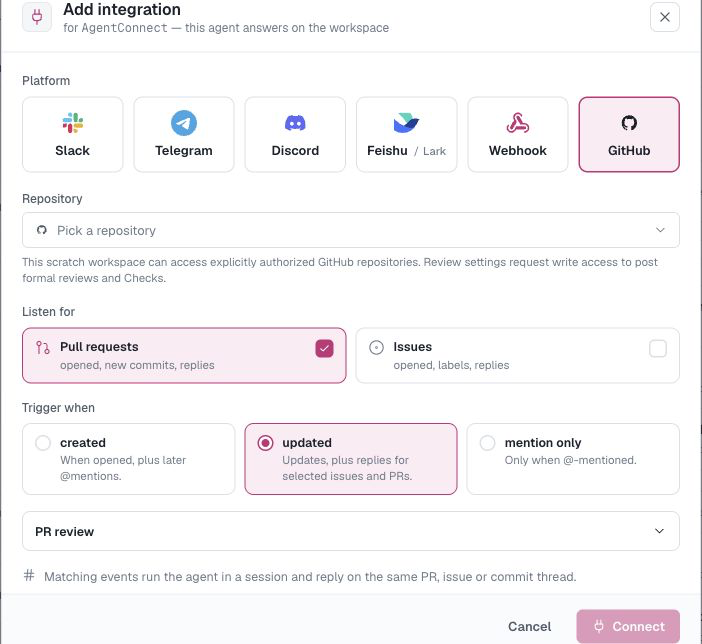
- Repository — pick from repositories covered by the GitHub App that the signed-in person may use. Public repositories remain available for read-only setup; private repositories require a linked GitHub identity with access. Picking a repo the agent isn't authorized for opens the authorize step right there.
- Listen for — pull requests, issues, or both.
- Trigger when — how eagerly the agent wakes up:
- created — when a PR or issue is opened, plus later explicit mentions in that selected family.
- updated — openings plus supported new revisions, labels, and replies. Closing, reopening, and body edits do not run the agent.
- mention only — when the assigned agent or GitHub App is @-mentioned. A native request for the App as PR reviewer is also explicit and can start matching PR reviewers.
Who may trigger an agent
AgentConnect checks the content author's current repository permission through GitHub. Only people with write or admin permission can start an agent automatically; GitHub's webhook author_association label is not used as authority.
- An issue or pull request opened by someone without current
writeoradminpermission does not start an agent, even if its body mentions the agent or GitHub App. - A current
writeoradminmaintainer can explicitly mention the agent or App in a comment to request the first turn on an externally authored thread. The same mention from a read-only user does nothing. - An unmentioned follow-up follows the configured cadence only when both the commenter and the original issue or PR author still have
writeoradminpermission. - Native review requests and Check reruns use the same current-maintainer boundary.
AgentConnect checks the author of each comment, including edited content; the webhook sender is not substituted for the content author. Trigger permission is separate from what the agent may do afterward: comments, formal reviews, Checks, and repository writes still require the configured AgentConnect repository grant and GitHub App permissions.
Public repositories: external issue bodies, pull requests, diffs, and comments remain untrusted input even though they cannot dispatch an agent without a maintainer request. Use a conservative permission mode and narrowly scoped repository credentials.
A GitHub identity linked to a signed-in AgentConnect profile can participate in two separate console-user checks:
- optional per-user repository authorization uses it to verify private-repository access and every write grant; and
- Settings → Session access → Follow GitHub access uses it when deciding whether the viewer may read a session from a private repository.
Public-repository read-only setup and public-repository sessions do not require a linked GitHub profile. Linking GitHub does not install the GitHub App, grant a repository, or change the webhook-author rules above. See Linked accounts.
What the agent does
Each qualifying event starts a session on the agent's daemon with the event as context (title, body, diff excerpt as applicable). An enabled watch can post the agent's ordinary final reply even when its workspace is Read only. Formal reviews, status Checks, and repository changes require Read & write authorization. See Workspaces & repositories.
Sessions triggered from GitHub appear in Sessions with the repo/thread as their channel, linked back to GitHub. When repository access sync is enabled, their read-only GitHub members audience follows the source repository's current visibility and the viewer's access rather than an AgentConnect role override.
PR reviews
For pull-request watches, expand PR review and choose:
- None — run the agent and post its final reply as an ordinary PR comment, without a formal review or Check.
- Brief — allow a formal
COMMENTreview and inline comments. - Details — expose controls for inline comments,
REQUEST_CHANGES,APPROVE, and an informational status Check.
Formal reviews require agent repository write access and effective GitHub App pull_requests:write permission. Informational Checks additionally require checks:write.
Several agents may watch the same repository. In a PR conversation, @<agent-name> targets one matching agent, while @<github-app-name> broadcasts to every matching reviewer. Both forms still respect event-family, label, installation, live maintainer authorization, and bot-sender safety checks.
When a PR cannot start automatically — most commonly because its author is not a current maintainer — an enabled status Check can offer Request review. A current write or admin maintainer can use that action to start the review without adding a comment.
For a complete two-model setup, see Fast PR reviews with deep review on demand.
Make the agent name autocomplete
GitHub's comment box suggests organization teams as you type @, but it has no way to suggest an agent name. Create a team in the organization named exactly after the agent and @<organization>/<agent-name> becomes a suggestion that targets that same one agent:
- In the organization, Teams → New team.
- Name it exactly the agent's name —
review-bot, not "Review Bot". - Leave visibility Visible. A secret team is not offered in the comment box.
- A description such as "AgentConnect Agent shortcut" tells your teammates what the entry is for.
The team needs no members: AgentConnect matches the text you typed, never the team's membership. Everything else is unchanged — the same event, label, authorization and safety checks apply, and plain @<agent-name> keeps working whether or not the team exists.
AgentConnect never creates, renames or deletes these teams; they are yours to manage. Teams exist only in organizations, so on a repository owned by a personal account only @<agent-name> applies.
Manage watches
The agent page groups its GitHub integration as one card — one row per watched repository with:
- event toggles and the trigger cadence select (create / update / @-mention),
- recent deliveries (what fired, when, and the session it started),
- Add repository to watch more repos with the same agent.
Requirements
- The GitHub app must be installed for your org (Settings → GitHub → Install on GitHub); the integration dialog offers the install button if it's missing, with an I've installed it — sync refresh.
- An enabled watch can post its ordinary final reply with Read only access. Formal reviews, Checks, and repository changes require Read & write.
- On AgentConnect OSS, the operator must first configure the deployment GitHub App and its Relay webhook.
Updated 22 days ago