

🔒 Session visibility
Control whether a transcript is available to Everyone, its owner, or people with access to its source conversation or repository.
Every session has its own audience, evaluated independently from the Team visibility of the Agent that ran it:
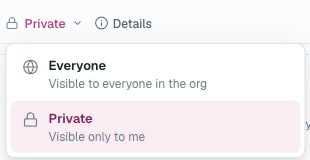
- Everyone — every organization member.
- Private — only the person matched as the session owner.
- Slack members — people whose linked Slack identity has access to the source conversation.
- GitHub members — people with access to the source repository.
- Feishu / Lark members — people whose linked regional identity belongs to the source chat.
Passing the session audience grants access only to that session's metadata, transcript, tool details, relationships, and live updates. It does not grant access to the owning Agent's page, configuration, workspace, or invocation controls. When a readable session belongs to an Agent outside your Team visibility, the console shows the Agent name as plain session context and a filter label, not as a link.
Default audience
| Session origin | Default |
|---|---|
| Playground, webchat, or Web API | Private |
| One-to-one direct message | Private |
| Shared chat conversation | Everyone |
| GitHub issue or pull request | Everyone |
| Schedule, webhook, or other automation | Everyone |
| Delegated agent work | Inherits the source session |
When an organization enables provider-based access below, new sessions from that provider override these defaults with the matching read-only provider audience.
Session access
Session access is an organization setting, on its own card on the Settings page. An Owner enables it per platform to make sessions follow that platform's own access rules instead of the per-origin defaults above.
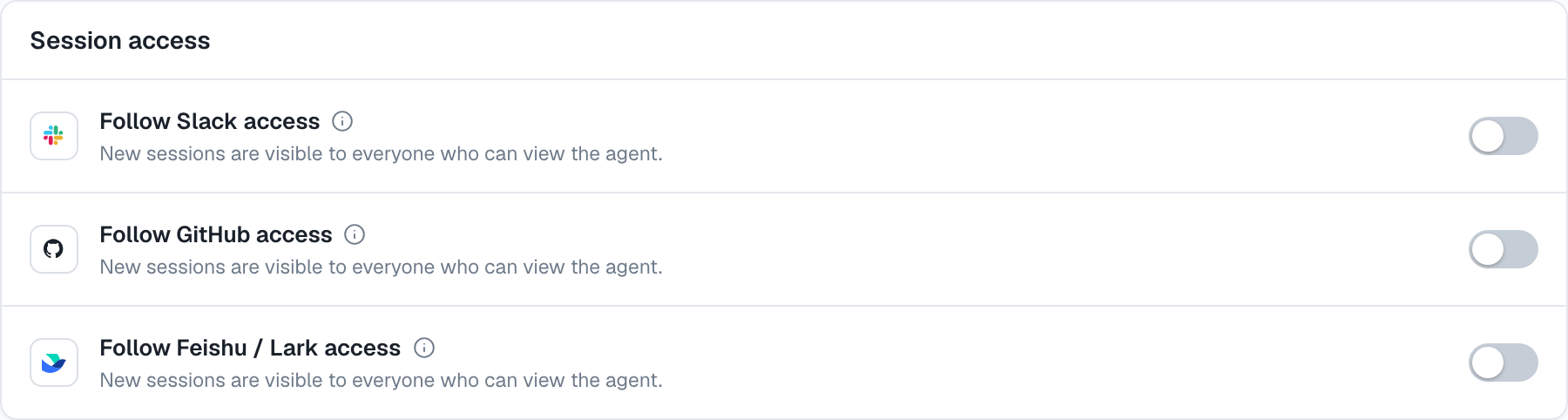
Each check needs a matching linked account. Organization membership, the Owner role, a personal API key, or a different provider identity does not substitute for it. The owning Agent's Team visibility is never part of these session checks: if your linked identity passes the provider rules, you can open the session even when the Agent itself is outside your Team visibility.
Follow Slack access
A Slack channel or group-DM session requires a linked identity from the same Slack workspace and current Slack access to the source conversation.
An active full member can read a public-channel session without joining that channel. Private channels and group DMs require current membership. Guests and Slack Connect users also require current conversation membership. One-to-one Slack DMs remain Private.
Follow GitHub access
A public-repository session remains available to every organization member. A private-repository session requires a linked GitHub profile with current access to that repository.
Linking GitHub does not install the GitHub App or grant repository access. It only supplies the identity used for the check.
Follow Feishu / Lark access
The session audience follows current membership in the source chat, including one-to-one chats. AgentConnect checks membership with the installed bot App for that chat.
Lark and Feishu bot integrations are available on AgentConnect Cloud. Social sign-in and this setting currently require a self-hosted deployment with a matching regional Login App and a linked identity that exposes the provider's union_id. The regional Login App limits admitted bot Apps to the same trusted workspace; their App IDs do not need to match. See Logto authentication for the self-hosted setup.
Private sessions
A Private session is visible only to its matched owner. There is no organization Owner override.
For directly managed sessions, that owner may switch between Everyone and Private in the session header. A Viewer may change a session they own; an Owner cannot change someone else's session audience. Making a source session Private also tightens any delegated work started from it.
Provider-bound sessions show a read-only audience. Change the organization's Session access setting rather than trying to reclassify one participant's copy.
Sessions do not currently support a Selected member list or a public share link.
Delegated and handoff sessions
An agent-to-agent child session inherits its parent session's audience because the handoff can carry source context into the child's transcript. Anyone who passes that inherited audience can follow the child session even when the target Agent is outside their Team visibility. The target Agent's name remains plain context; the Agent itself, its workspace, and its controls stay unavailable.
Tightening a source session to Private also tightens its descendants. Widening a source session does not automatically publish a child that was already narrowed.
When a session link is unavailable
AgentConnect uses the same unavailable response when a session does not exist, was removed, or falls outside your session audience, so the response does not reveal protected session existence. For a provider audience, confirm that the matching social account is linked and still has access to the source conversation or repository. A hidden owning Agent by itself does not make an otherwise readable session unavailable.
Usage and transcript access
Organization Owners can see complete Analytics totals, agent and model breakdowns, and spend over time, including usage from Private and provider-restricted sessions. These aggregates do not reveal session IDs, titles, transcripts, or tool details, and do not make those sessions available in the session list or through a direct link.
Collaborators and Viewers receive attribution only for Agents and Sessions they can access. Withheld usage remains in the organization total and the Restricted usage rollup.
Memory caveat
For AgentConnect-managed or supported external memory, making an Everyone session Private stops future shared-memory capture after the daemon applies the change. It does not remove information already captured while the session was visible to Everyone.
Provider scope alone does not exclude a session from shared-memory capture or recall. A Private session can still recall existing agent-scoped memory. Runtime-native memory has no per-session AgentConnect gate, so a private transcript can still influence what that runtime recalls later.
AgentConnect OSS
AgentConnect OSS requires optional OIDC sign-in and provider identity lookup for these checks. Slack additionally needs workspace and conversation access checks; GitHub needs repository checks; Lark and Feishu need a regional Login App, union_id in the linked identity, and bot membership permissions. See Logto authentication.
Updated 2 days ago