

🔑 API keys
Mint personal keys that act as you against the REST API — list agents, read sessions, drive schedules from scripts and CI.
Everything the console does rides a REST API at https://api.agentconnect.md — and you can call it yourself. On AgentConnect OSS, the bundled stack serves the same API at <your-control-plane-url>/api/v1. A personal API key authenticates as you, with your role, in one organization.
Create a key
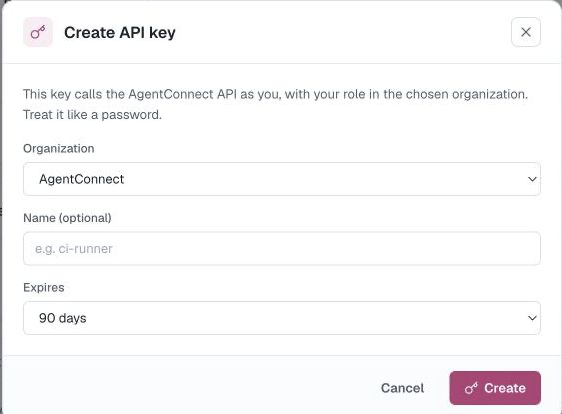
Profile → API keys → New key:
- Organization — the org this key is bound to.
- Name — optional label ("ci-runner").
- Expires — 30 / 60 / 90 days, 1 year, or never (90 days default).
The key is displayed exactly once — copy it then. The list afterwards shows only the tail, expiry and last-used time.
Use it
curl https://api.agentconnect.md/v1/orgs \
  -H "Authorization: Bearer $AGENTCONNECT_API_KEY"
Every resource is org-scoped under /v1/orgs/{orgId}/… — list agents, read session metadata and messages, manage schedules, trigger runs. Explore the full surface in the API reference, or pull the raw OpenAPI document from https://api.agentconnect.md/v1/openapi.json.
Since the key carries your role, a Viewer's key can read but not mutate — handy for dashboards.
The same key also authenticates the MCP connector in headless clients — pass it as the Authorization: Bearer header instead of doing the browser OAuth flow.
Revoke
Revoke kills a key immediately — anything still using it starts getting 401s. Rotate by minting a new key first, moving your scripts, then revoking the old one.
Other credentials, for completeness
- Daemon keys — minted by Add daemon, they authenticate a machine, not a person. Shown once in the install command; revoked when the daemon is deleted.
- Bot tokens — belong to the chat platforms; see Bots.
Updated about 2 months ago