

🪝 Webhooks
An HTTPS endpoint that turns any POST into an agent session — with an HMAC signature to verify it's really you.
A webhook integration gives an agent an inbound HTTPS endpoint. Anything that can POST JSON — CI, monitoring, cron on another box, your own app — can start the agent.
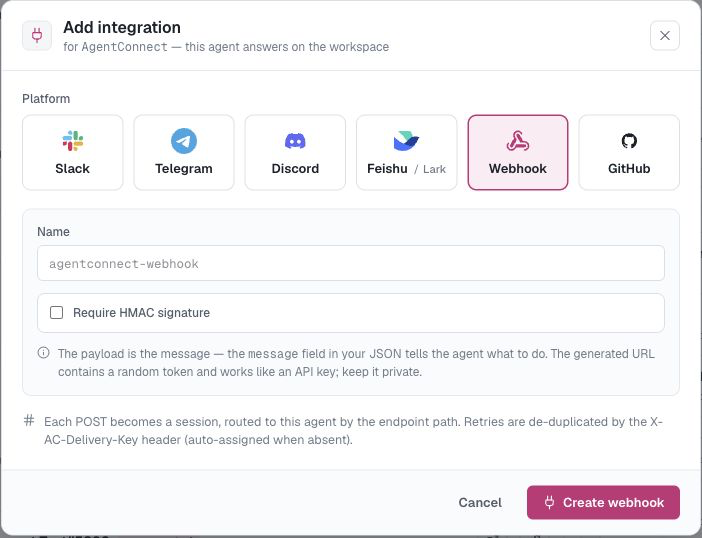
Create one
On the agent: Integrations → Add integration → Webhook, name it (defaults to <agent>-webhook), Create. The dialog reveals:
- Inbound endpoint — the
POSTURL for this integration. - Signing secret — shown only once; copy it now. Used to authenticate your requests.
- Send a test delivery — a ready-made curl with an editable message, so you can fire a test before writing any code.
Send a message
The JSON request body becomes the message the agent receives. Keep it focused, and put the instructions before large logs or diagnostic payloads:
BODY='{"message":"Deploy of api-server v2.31 failed on step migrate — investigate and summarize."}'
SIG=$(printf '%s' "$BODY" | openssl dgst -sha256 -hmac "$WEBHOOK_SECRET" -r | cut -d' ' -f1)

curl -X POST "$WEBHOOK_URL" \
  -H "content-type: application/json" \
  -H "X-AC-Signature: sha256=$SIG" \
  -d "$BODY"
The signature is an HMAC-SHA256 of the raw request body with your signing secret, sent as X-AC-Signature: sha256=<hex>. Requests with a missing or wrong signature are rejected.
What happens
Each delivery starts (or continues) a session on the agent's daemon — you'll find it in Sessions with the webhook as its trigger, full transcript included. The agent's page shows the webhook's recent deliveries and when it last fired.
Tips
- Put instructions in the message, not just data: "Here's the failing build log: … Diagnose and open a ticket draft" beats a bare log dump.
- Pair webhooks with a GitHub workspace so the agent can actually inspect the code it's being told about.
- Rotate by deleting the webhook integration and creating a new one (new URL + secret).
Updated 22 days ago